Cat8 supports 25 and 40 Gbps over a maximum of 30 meters at 2000 MHz. Cat7 supports 10 Gbps over 100 meters at 600 MHz. Cat8 is the faster cable, and Cat7 is the longer reaching one.
Two units matter here. Gbps (gigabits per second) measures how much data moves each second. MHz (megahertz) measures bandwidth, the range of signal frequencies a cable can carry without falling apart.
Think of bandwidth as the number of lanes on a road. Cat8 has far more lanes than Cat7, but the road is short. Cat7 has fewer lanes and runs the full distance of a normal office network.
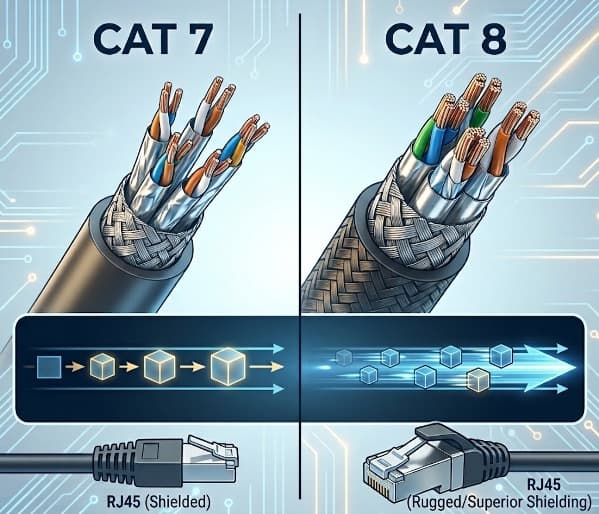
Cat7 vs Cat8 Performance Matrix
The table below compares both cables on the specifications that decide most purchases. Cat7 and Cat8 both use S/FTP shielding, meaning every wire pair has its own shield and the whole bundle has an outer foil layer.
| Feature | Cat7 | Cat8 |
|---|---|---|
| Maximum speed | 10 Gbps | 25 or 40 Gbps |
| Bandwidth | 600 MHz | 2000 MHz |
| Distance at top speed | 100 meters | 30 meters |
| Shielding | S/FTP | S/FTP |
| Recognized by TIA | No | Yes |
| Official connector | GG45 or TERA | RJ45 (Cat8.1) or GG45 and TERA (Cat8.2) |
| Typical use | Specialist and European installations | Data center server to switch links |
| Handling | Thick and stiff | Thicker, stiffer, and pricier than Cat7 |
How Much Faster is Cat8 Than Cat7?
Cat8 is up to four times faster than Cat7 in top speed, at 40 Gbps against 10 Gbps. Cat8 also carries more than three times the bandwidth, 2000 MHz against 600 MHz.
The speed gap exists only on short links. Cat8 can also run 10 Gbps up to 100 meters, which puts it level with Cat7 on long runs.
You will only see the 25 and 40 Gbps benefit if both devices have matching ports. A server and a switch with 25 Gbps or 40 Gbps ports can use Cat8. A home router with 1 Gbps ports cannot.
Why is Cat8 Limited to 30 Meters?
Cat8 is limited to 30 meters because the 25 and 40 Gigabit Ethernet standard, IEEE 802.3bq (2016), defines a channel of only 30 meters. Signals at 2000 MHz lose strength quickly, so the copper cannot carry them farther.
A channel is the full cable path between two devices, including patch cords at each end. In a data center, a server and its top of rack switch sit a few meters apart, so 30 meters is more than enough.
An office floor is a different case. Cable runs from a closet to a desk often pass 30 meters, which is why Cat8 is not a general upgrade for commercial buildings.
Is Cat7 an Official Ethernet Standard?
Cat7 is an official international standard but not a North American one. ISO/IEC 11801 ratified Category 7 in 2002, and TIA chose not to recognize it because no application needed it at the time.
The connector adds a second problem. The official Class F channel uses GG45 or TERA connectors, not the RJ45 plug found on every laptop, router, and switch.
Most Cat7 cables sold today carry RJ45 plugs anyway. The RJ45 plug is rated to about 500 MHz, so it limits the link to Cat6A level performance. Under TIA test methods, these cables perform at Cat6A levels.
What Are Cat8.1 and Cat8.2?
Cat8 comes in two versions under ISO/IEC 11801. Cat8.1 works with standard RJ45 connectors and is compatible with Cat6A. Cat8.2 needs TERA or GG45 connectors and is compatible with Cat7A.
Cat8.1 is the version sold for most data center use in North America. Cat8.2 appears in installations that follow ISO practice.
Should You Buy Cat7 or Cat8 for Home, Office, or Data Center?
Most buyers should choose neither and buy Cat6A. Cat6A runs 10 Gbps across 100 meters with standard RJ45 connectors and is recognized by TIA. Professional installers often pick Cat6A or fiber over Cat7.
Use this guide to match the cable to the job:
- For a home network, Cat6A already covers any speed a home internet plan delivers, so Cat7 and Cat8 add cost without a visible gain.
- For an office with runs over 30 meters, Cat6A is the correct choice because Cat8 cannot hold its top speed that far.
- For a data center with 25 or 40 Gbps servers and short links, Cat8 is the right cable.
- For an existing European installation built around GG45 or TERA connectors, Cat7 or Cat7A fits the system already in place.
Frequently Asked Questions
Can Cat7 cable run 40 Gbps?
No. The 40 Gigabit Ethernet standard over twisted pair was defined for Category 8 cabling rated to 2000 MHz (IEEE 802.3bq, 2016). Cat7 is rated to 600 MHz and tops out at 10 Gbps.
Does Cat8 work with regular RJ45 ports?
Yes, when the cable is Cat8.1. It uses the standard RJ45 plug and plugs into ordinary ports. The link runs at the speed both devices support.
Do I need Cat8 for gaming or streaming?
No. Your internet plan and router ports set the speed limit long before the cable does. Cat6 or Cat6A handles gaming and streaming comfortably.
Are Cat7 and Cat8 cables shielded?
Yes, both use S/FTP construction. Each pair is shielded on its own, and an outer foil layer wraps the full bundle. This shielding reduces interference from nearby electrical equipment.
Is Cat8 worth the extra cost?
Cat8 is worth it for 25 or 40 Gbps links up to 30 meters, such as server to switch connections. It is thicker, stiffer, and more expensive than Cat6 or Cat7, so buying it for a home or a standard office adds cost with no benefit.
Final Verdict
Cat8 wins on speed and is the only one of the two that TIA recognizes, but it works only on links up to 30 meters. Buy it for data center racks with 25 or 40 Gbps equipment.
Cat7 offers no speed advantage over Cat6A in most setups, and its official connectors are not RJ45. Unless an existing installation calls for it, Cat6A is the safer and cheaper pick.
Comments are closed, but trackbacks and pingbacks are open.