An Ethernet splitter, a network switch, and a network hub all look like small boxes with Ethernet ports, but they do very different jobs.
If you want more wired ports, you need a switch. A splitter shares one cable between two slow devices, and a hub is outdated equipment. Mixing them up is the most common reason people buy the wrong one.
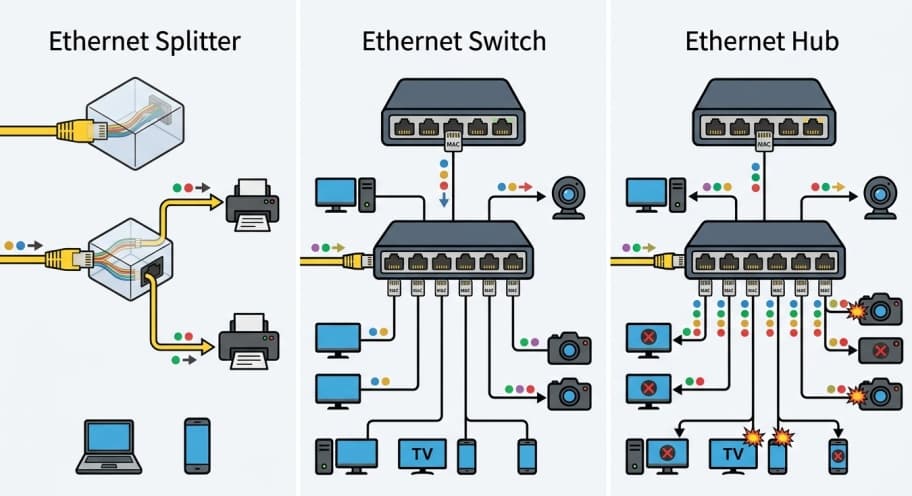
What Is the Difference Between an Ethernet Splitter, Switch, and Hub?
The difference between an Ethernet splitter vs switch vs hub is how each one handles data. A splitter squeezes two links into one cable and does nothing else. A switch reads addresses and delivers data to the right port. A hub copies every signal to every port with no addressing at all.
Only the switch expands a network in the way most people want. The splitter and the hub each solve a narrower problem, and the hub no longer has a real use.
| Feature | Ethernet splitter | Network switch | Network hub |
|---|---|---|---|
| Needs power | No | Yes | Yes |
| What it does | Puts two connections on one cable | Forwards data to the correct port | Repeats data to all ports |
| Adds ports to your network | No | Yes | Yes |
| Maximum speed | 100 Mbps per connection | 1 Gbps and higher | 100 Mbps shared by all ports |
| Duplex | Follows the link | Full duplex | Half duplex |
| Power over Ethernet (PoE) | No | Yes, on PoE models | No |
| Still worth buying | Rarely | Yes | No |
What Is an Ethernet Splitter and How Does It Work?
An Ethernet splitter is a small passive adapter that puts two separate Ethernet connections onto one cable.
Passive means it has no power supply and no electronics that read data. You need one splitter at each end of the cable, and it only works for links running at 10 or 100 Mbps.
A standard Ethernet cable holds four twisted pairs of wire, eight wires in total. Fast Ethernet (100 Mbps, called 100BASE-TX) uses only two of those pairs, one to send and one to receive. A splitter puts a second connection on the two idle pairs.
Think of a four lane road where traffic only ever uses two lanes. The splitter opens the empty lanes to a second stream of cars. The road is no wider and no faster, it just carries two streams.
Here is how a splitter setup runs:
- Plug two Ethernet cables from two free router or switch ports into the first splitter.
- Connect the first splitter to the single long cable run.
- Plug the second splitter into the far end of that cable.
- Connect your two devices to the two jacks on the second splitter.
The limits are strict. Gigabit Ethernet (1000 Mbps, called 1000BASE-T) uses all four pairs, so a splitter forces the link down to 100 Mbps or stops it working.
A splitter also blocks PoE, and it still needs two free ports on the router or switch at the source end.
The one honest use is an old cable buried in a wall that feeds two low demand devices, such as a printer and a smart TV.
What is a Network Switch and How Does It Work?
A network switch is a powered device that connects several devices on a local area network (LAN) and sends each piece of data only to the port where its destination is plugged in. This is why a switch is the right answer when you need more Ethernet ports.
Every network card has a MAC address, a unique hardware ID. When a device sends a frame (one unit of Ethernet data), the switch notes the sender’s MAC address and which port it arrived on.
It stores this in a MAC address table. Later, it reads the destination MAC address and delivers the frame to that one port.
Picture a mail clerk in an office. The clerk reads the name on each envelope and walks it to the right desk, instead of shouting the contents across the room.
Switches also run in full duplex, which means a port can send and receive at the same time. Each port is its own collision domain, meaning a segment where two devices sending at once would corrupt each other’s data. With full duplex on every port, collisions do not happen.
Two common types are worth knowing:
- An unmanaged switch is plug and play and fits most homes and small offices.
- A managed switch adds settings such as virtual LANs (VLANs), which split one physical network into separate logical ones, and traffic prioritization.
- A PoE switch also sends power down the cable to devices such as IP cameras and wireless access points.
A switch does not make your internet faster. It shares your router’s connection between more wired devices, and it gives each device full speed on the local network.
What is a Network Hub and Why is It Obsolete?
A network hub is a physical layer (Layer 1) device that receives a signal on one port and repeats it out of every other port.
It cannot read MAC addresses, so it cannot tell which device the data is meant for. Every connected device receives every frame.
Think of one person shouting in a crowded room. Everyone hears the message, and if two people shout at once, nobody understands either one.
That is what happens on a hub. All ports share one collision domain and run in half duplex, so a device can send or receive but not both at once.
Devices must listen first and wait for a quiet moment, a method called CSMA/CD. When two devices send at once, a collision occurs and both must try again.
Bandwidth is shared too. Four computers on a 100 Mbps hub split that 100 Mbps between them. Every device can also see all traffic on the segment, which is a security problem.
A switch fixes all of this at a similar price. There is no current situation where a hub is the better purchase, so treat any hub you find as legacy equipment to replace.
Which Should You Choose: Splitter, Switch, or Hub?
Choose a network switch in almost every case. Choose a splitter pair only when you cannot run a second cable and both devices at the far end are slow. Do not choose a hub.
| Your situation | Best choice | Reason |
|---|---|---|
| You need more wired ports near your router | Switch | It creates new ports, and a splitter cannot |
| You need gigabit speed | Switch | Splitters are capped at 100 Mbps |
| You need to power a camera or access point over the cable | PoE switch | Splitters do not pass PoE |
| One old cable in a wall must serve two low speed devices, and you have two free router ports | Splitter pair | It shares the existing cable |
| You are building any new network | Switch | It is cheap, fast, and simple |
Conclusion
Buy a network switch for almost every wired network. It adds ports, supports gigabit speed and higher, and powers devices over PoE when you pick a PoE model.
Use an Ethernet splitter pair only when one existing cable must serve two devices that never need more than 100 Mbps.
Skip the hub: it shares bandwidth, causes collisions, and does nothing a switch does not do better.
Comments are closed, but trackbacks and pingbacks are open.