Matter over Thread and Matter over WiFi are two ways to connect the same kind of smart home device. Thread is a low power mesh radio. WiFi is the network already running in your house.
Matter is the shared language on top of both. The right pick depends on how a device is powered and how much data it sends.
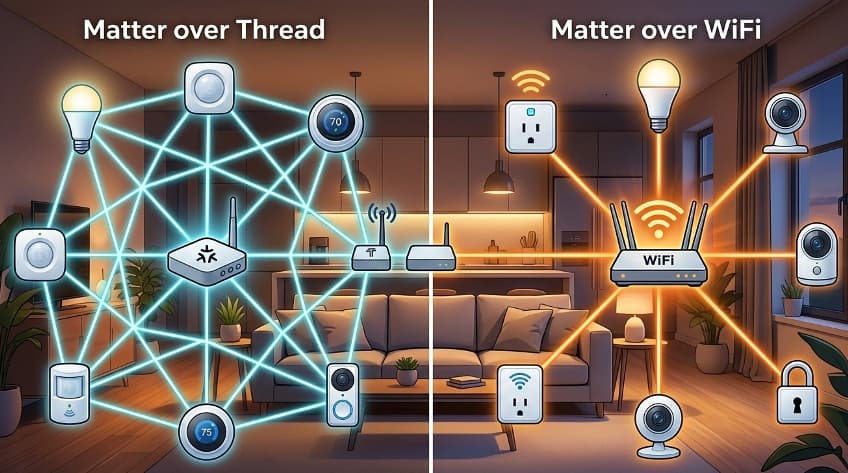
What Is the Difference Between Matter, Thread, and WiFi?
Matter is a communication standard, and Thread and WiFi are the networks that carry it.
Matter tells devices how to talk to each other, while the network decides how the signal travels. The Connectivity Standards Alliance (CSA) published Matter 1.0 in October 2022.
Think of Matter as the language two people speak. Thread and WiFi are two different phone lines they can use to have the conversation.
A third option exists too. A Matter device can run over Ethernet, and all three connection types are valid. This article focuses on Thread and WiFi because those are the two choices most buyers face.
How Matter over Thread Works
Matter over Thread sends commands through a mesh of small radios and uses a border router to reach the rest of your home network.
Thread is built on the IEEE 802.15.4 radio standard and uses the 2.4 GHz band. Every Thread device has an Internet Protocol (IP) address, which is why it pairs well with Matter.
A mesh network lets devices pass messages to each other instead of all talking to one central point.
Any plugged in Thread device can act as a relay and extend coverage for battery powered devices. Adding more powered Thread devices makes the mesh stronger.
The mesh also repairs itself. If one router in the network fails, another can take over.
A border router connects the Thread mesh to your home network, and normal smart home use needs at least one.
Many speakers, displays, and hubs already include one. Samsung, for example, has added border routers to a growing number of its devices.
How Matter over WiFi Works
Matter over WiFi connects a device to your existing router the same way a phone or laptop connects. No border router is needed, because the WiFi router is the only hardware required.
This is the simplest setup for devices that stay plugged in. For an always powered smart plug, WiFi works fine. WiFi also suits appliances, displays, and many cameras that need more bandwidth.
Cameras are the clearest example. Matter 1.5, released November 20, 2025, added the first standard model for cameras and video doorbells. The specification covers cameras working over WiFi, Power over Ethernet, or standard Ethernet.
Matter 1.5 also added full support for Transmission Control Protocol (TCP), a reliable transport method that handles large data transfers better.
Retail support for new device types usually trails the specification, so check a product before you buy.
Matter over Thread vs Matter over WiFi
The two options differ most in hardware needs, bandwidth, and power use. The table below compares them on the points that matter when you buy.
| Factor | Matter over Thread | Matter over WiFi |
|---|---|---|
| Network used | Low power mesh on IEEE 802.15.4 | Your existing WiFi network |
| Extra hardware | At least one Thread border router | None beyond your WiFi router |
| Maximum data rate | 250 kbps on 2.4 GHz (arXiv IoT Survey, 2019) | High enough for video |
| Power use | Designed for very low power (Phone Scoop, 2026) | Higher, best for plugged in devices |
| Range | Mesh extends as you add powered devices | Single hop to the router |
| Radio band | 2.4 GHz | 2.4 GHz or 5 GHz, depending on the device |
| Best for | Sensors, locks, switches, remotes | Plugs, cameras, displays, appliances |
Which Devices Should Use Thread and Which Should Use WiFi?
Use Thread for devices that run on batteries and send small messages, and use WiFi for devices that stay plugged in and send more data.
Thread is best for low power devices that need local mesh behavior without a WiFi radio.
That rule gives a practical split by device type:
- Door and window sensors, motion sensors, and temperature sensors belong on Thread because they run on small batteries for a long time.
- Door locks and wireless switches fit Thread for the same reason, and they also gain from the faster local response of a mesh.
- Smart plugs and light bulbs can use either network, so the better choice is the one that matches the border router or router you already own.
- Security cameras and video doorbells belong on WiFi or Ethernet, since Thread cannot carry video at 250 kbps.
One caution applies to Thread. Battery powered devices do not relay messages, so a mesh built only from sensors has weak spots. Place a few plugged in Thread devices between your sensors and the border router.
Does Matter over Thread Slow Down Your WiFi?
Thread and 2.4 GHz WiFi share the same radio band, so heavy use of one can affect the other. In practice Thread sends very small messages, so its own traffic is light.
A crowded 2.4 GHz channel is the usual cause of trouble, and the fix is the same either way. Keep your phones and laptops on 5 GHz where you can, and leave 2.4 GHz for devices that need it. Thread devices stay on 2.4 GHz and are not affected by what happens on 5 GHz.
WiFi devices add load in another way. Each Matter over WiFi device is a client on your router, so a home with dozens of WiFi plugs and bulbs asks more of the router than a home that moved those devices to Thread.
Moving low data devices to Thread frees the router for phones, streaming, and cameras.
What Happens When Your Border Router or Router Goes Down?
A Thread network stays separate from the internet and needs a border router to bridge to your home network. If your only border router loses power, the mesh stays intact but your phone and hub cannot reach it.
Adding a second border router solves most of this. When one border router goes offline, another takes over and keeps the mesh connected.
Matter over WiFi has a simpler failure point. The router is the network, so a router outage takes every WiFi device offline at once. A Thread mesh with two border routers can survive the loss of either one.
Thread 1.4 and Matter 1.6: What Changed for Buyers
Thread 1.4 made border routers from different brands work together, and that matters if you own more than one ecosystem.
The Thread Group published version 1.4 in September 2024. It standardizes how devices share network credentials, the access data a device needs to join a mesh.
Before this change, border routers from different brands often built separate Thread networks. Since January 1, 2026, new border routers can only be certified against Thread 1.4.
Matter 1.4.2 also requires border routers and network infrastructure managers to be certified for Thread 1.4.
Matter itself keeps moving. Matter 1.6 was the latest released specification as of June 22, 2026. Matter 1.6 build for both Thread and WiFi chips in June 2026, and noted that CSA certification for that version was not yet finalized.
Before buying any device sold as Matter compatible, confirm it in the CSA Distributed Compliance Ledger at csa-iot.org.
How to Choose Between Matter over Thread and Matter over WiFi
Choose by device type first and by your existing hardware second. This short process works for most homes:
- Check how the device is powered. Battery devices should be Thread, and plugged in devices can be either.
- Check how much data the device sends. Anything that streams video needs WiFi or Ethernet.
- Check what border routers you already have. Many speakers, displays, and hubs include one, so you may not need to buy anything.
- Count your WiFi devices. If your router already struggles, put new low data devices on Thread.
- Plan for a second border router if you depend on Thread for locks or sensors.
Conclusion
Matter over Thread is the better fit for devices that run on batteries and send short messages.
Matter over WiFi is the better fit for devices that stay plugged in or stream data. Both work in the same smart home because Matter handles the conversation regardless of the network underneath.
Start with the border routers and router you already own, add Thread for sensors and locks, and keep cameras on WiFi or Ethernet.
If you rely on Thread, add a second border router so one outage does not cut off the whole mesh.
Comments are closed, but trackbacks and pingbacks are open.