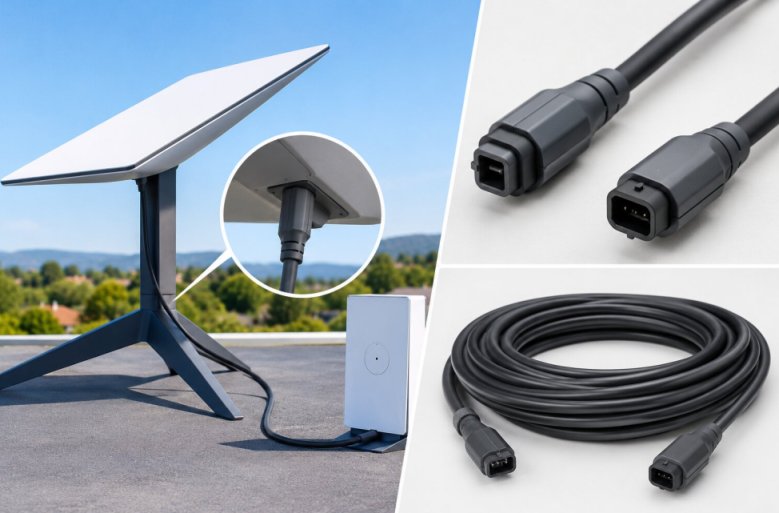
Starlink Gen 3 uses a shielded Ethernet style cable with an RJ45 connector on each end. The cable carries both data and power to the dish, a method called Power over Ethernet (PoE).
Starlink describes it as a 15 m detachable power over Ethernet cable running between the dish and Router 3.
RJ45 is the standard 8 pin plug found on ordinary home Ethernet cables. Think of the Gen 3 cable as one line that does the work of a phone charger and a data cable at the same time.
Naming can confuse buyers. Retailers often label the Standard kit “Gen 3” or “V4”, while Starlink calls the router included in the kit “Router 3”. All three names point to the same cable type covered in this article.
How the Gen 3 Cable Differs From a Normal Ethernet Cable
The Gen 3 cable looks like a standard Ethernet cable but is built for a harder job. It has moisture seals on the connectors and is made to carry the dish’s power load.
Starlink says the cable has a water resistant seal with a locking mechanism and is power rated for the kit.
One installer guide describes Starlink cables as Cat6 Ethernet, meaning Category 6, a cable grade rated for gigabit speeds. Starlink itself only says the cable conforms to RJ45 standards.
| Feature | Starlink Gen 3 cable | Typical indoor patch cable |
|---|---|---|
| Carries | Power and data | Data only in most setups |
| Connector | RJ45 with moisture seal and locking design | Plain RJ45 |
| Shielding | Shielded | Often unshielded |
| Outdoor use | Built for it | Usually not rated |
| Included length | 15 m (49.2 ft) | Varies |
Which Ports Does the Gen 3 Cable Plug Into?
The cable connects the Starlink dish to the dish port on Router 3. Router 3 also has two latching Ethernet LAN ports under removable covers, and those are for wired devices or a third party router. The LAN ports do not power the dish.
The router connector uses a passive latch design. To remove the cable from either the router or the dish, pull straight out.
Because a latch is easier to knock loose than a screw fitting, tie the cable down so no weight hangs on the connector.
How the Gen 3 Cable Compares to Gen 1, Gen 2, and Mini Cables
The Gen 3 cable is the first Starlink dish cable to use a standard RJ45 connector. Gen 1 and Gen 2 used proprietary plugs, which meant a separate Starlink Ethernet adapter was needed for a wired connection. Gen 3 removes that requirement for the router connection.
| Kit | Cable connector | Power method |
|---|---|---|
| Gen 1 and Gen 2 | Proprietary plug | Power and data through the proprietary cable |
| Gen 3 (Standard) | RJ45 | Power over Ethernet from Router 3 |
| Starlink Mini | DC power cable | 15 m (49.2 ft) DC power cable |
Do not buy a Gen 2 cable for a Gen 3 dish. Check the connector on your dish first, because an RJ45 style port means Gen 3 while a proprietary plug means an older kit.
Can You Extend the Starlink Gen 3 Cable?
Yes, extension is possible, but Starlink recommends against it. Its Help Center says modifying the cable or joining it to another cable can affect service quality and may let water reach the hardware.
Installers report a workable option: a waterproof coupler joined to aftermarket shielded Cat6 cable. Starlink also sells longer cables directly, and that route avoids the coupler entirely.
Length matters more than most people expect. The same guide advises keeping total cable length under 150 ft (45 m) because longer runs lose voltage.
The 328 ft (100 m) limit that applies to ordinary Ethernet networks is not a Starlink specification. Use a single cable in a supported length whenever you can.
How to Choose a Replacement Gen 3 Cable
A good replacement matches the original in connector, shielding, weather protection, and length. Check these four points before you buy:
- The cable has RJ45 connectors on both ends, not the proprietary Gen 2 plug.
- The cable is shielded and rated for outdoor use with a sealed connector.
- The seller states that the cable supports Starlink power and data, not data only.
- The length covers your route with a few extra feet for slack at the dish.
Third party sellers such as Stargear make Gen 3 replacement cables. Starlink’s official cable stays the safest pick for warranty and water protection.
Frequently Asked Questions
What connector does the Starlink Gen 3 cable have?
The connector is RJ45, the same plug shape used on regular Ethernet cables. Starlink adds moisture seals and a locking design to it.
Is the Starlink Gen 3 cable the same as a Cat6 cable?
Not exactly. One installer guide calls it a Cat6 assembly, but Starlink only states that it conforms to RJ45 standards. Treat it as a purpose built Starlink cable, not an ordinary patch lead.
Can I use a regular Ethernet cable with Starlink Gen 3?
A regular cable is not a safe swap. Starlink warns that third party cables can cause water damage and that it cannot guarantee service quality with modified or combined cables. If you extend the run, use shielded outdoor rated cable and a waterproof coupler.
Does the Starlink Mini use the same cable as Gen 3?
No. The Mini uses a 15 m (49.2 ft) detachable DC power cable, not a power over Ethernet cable.
Conclusion
Starlink Gen 3 uses a shielded cable with RJ45 connectors on both ends. It carries power and data from Router 3 to the dish, and the kit includes a 15 m (49.2 ft) length.
If you need more reach, a longer cable from Starlink is the safest route. If you go with a third party cable or a coupler, pick shielded, outdoor rated cable with sealed RJ45 ends and keep the total run under about 150 ft.
Before you buy anything, check the connector on your dish. An RJ45 style port means a Gen 3 cable fits, and a proprietary plug means you have an older kit that needs a different cable.
Comments are closed, but trackbacks and pingbacks are open.